Why AI work quickly outgrows local machines
A small prototype might run fine on a laptop or a single workstation, but AI work rarely stays small. Datasets grow from spreadsheets to millions of records, experiments multiply, and suddenly you need to run the same training job ten different ways to compare results. Even “simple” steps like preprocessing images or embedding documents can saturate CPU, memory, and disk long before the model itself becomes advanced.
Local machines also hit practical ceilings: limited GPU memory, slow storage for large files, and no easy way to add capacity for a busy week and scale back afterward. Buying on-prem hardware can solve some of this, but it ties up capital, needs ongoing maintenance, and risks being underused once the workload shifts.
Training needs bursty compute and fast storage

A common pattern in model training is that demand comes in spikes. You might spend days cleaning data and tuning features, then need a short window where you run dozens of training jobs back-to-back to hit a deadline, compare architectures, or retune after a product change. That “bursty” rhythm is awkward on owned hardware: either you buy enough GPUs and CPUs for peak demand, or you wait in line behind your own constraints.
Training also punishes slow storage. If your GPUs are ready but your data pipeline can’t feed them quickly, you pay for expensive compute that sits idle. This shows up as long “data loader” times, constant re-reading of the same files, or checkpointing that drags out runs. Cloud setups often pair on-demand compute with high-throughput object storage, local SSD caches, and parallel file systems, but you still pay for data egress, duplicated copies, and the work of making pipelines reliable at scale.
Data gravity: moving datasets is the hidden tax
You also run into “data gravity”: once a dataset gets large and actively used, everything wants to live near it. Copying a few gigabytes is trivial; copying tens of terabytes repeatedly—raw data, cleaned versions, feature tables, embeddings, and labels—turns into days of transfer time, brittle scripts, and surprise bills. Even when the cloud compute is cheap for a week, the data movement can erase the savings.
This is where teams get stuck in half-and-half setups. Data sits on-prem for comfort or compliance, but training runs in the cloud for speed, so every experiment pulls data over a VPN, re-materializes it into cloud storage, and then pushes results back. The costs aren’t just egress fees; they’re duplicated storage, extra ETL work, and slower iteration because someone has to track which copy is “the” copy. A practical rule: put training compute where the authoritative dataset already lives, or plan for a durable, governed replica.
Choosing between IaaS, managed ML, and platforms
A familiar fork shows up once data and training move to the cloud: do you rent raw infrastructure (IaaS), use a managed ML service, or adopt a higher-level platform that standardizes the whole workflow. IaaS—VMs, GPUs, Kubernetes, object storage—gives maximum control and portability, which matters if you have custom training code, unusual networking needs, or strict dependency requirements. The tradeoff is that you own the “glue”: images, cluster setup, autoscaling, job scheduling, secrets, logging, and failure recovery. That effort is real, and it competes directly with model and product work.
Managed ML services reduce that operations surface by packaging training jobs, experiment tracking, and model registries behind APIs. You usually get faster time-to-first-run and fewer footguns, but you accept opinionated workflows and service-specific limits. Platforms go further by enforcing templates, permissions, and reusable pipelines across teams, which helps when multiple products share data and models. The cost is lock-in through configuration, metadata formats, and integrated tooling. If your bottleneck is infrastructure reliability, lean managed; if it’s differentiated training logic, stay closer to IaaS.
Deploying models: latency, scale, and reliability tradeoffs
A model that looks good in a notebook can still fail in production for mundane reasons: it’s too slow, too expensive to run at steady traffic, or unreliable under peak load. Deployment starts with a simple question: does the product need a response in tens of milliseconds (autocomplete, fraud checks) or can it tolerate seconds (summaries, batch enrichment)? Tight latency often pushes teams toward smaller models, aggressive caching, or specialized inference hardware, while looser latency lets you trade speed for quality or cost.
Scale changes the shape of the problem. A demo can run on one GPU; a real launch needs concurrency controls, request batching, autoscaling policies, and careful cold-start behavior if you use serverless-style endpoints. Reliability adds more constraints: versioned rollouts, fallbacks when upstream data is missing, and monitoring that catches drift and quality regressions, not just crashes. These safeguards take engineering time and can double the “real” footprint compared to the model alone.
Security, compliance, and cost don’t fix themselves
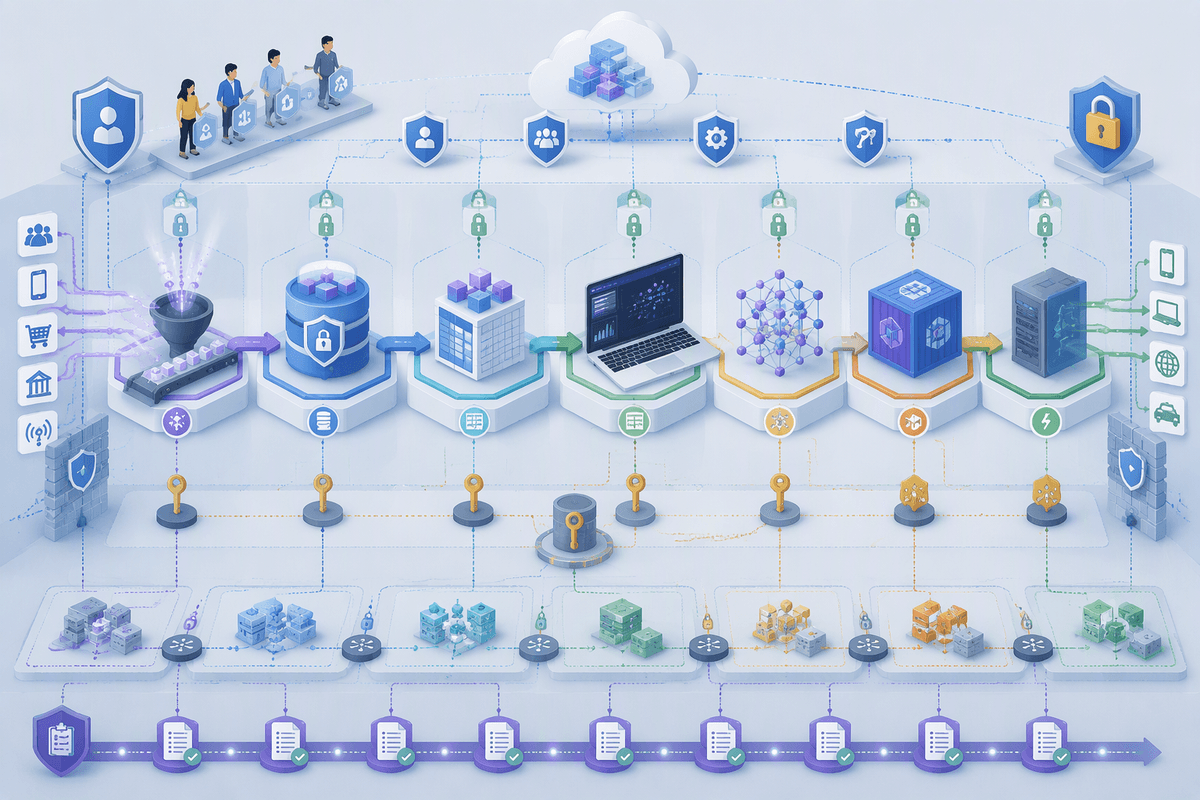
In practice, the first “cloud decision” that gets revisited is rarely about model quality. It’s about whether you can explain, control, and audit what happened to the data and who touched it. Customer data, regulated records, and internal IP tend to sprawl across object storage, feature tables, notebooks, training jobs, and model endpoints. Each hop adds a new surface area: identity and access policies, encryption at rest and in transit, key management, network boundaries, and an answer for where logs and prompts are stored. Managed services reduce some work, but they don’t remove accountability; you still need clear data retention rules, deletion workflows, and a way to prove them.
Cost behaves the same way: it doesn’t “settle” on its own. Training spend can be spiky and obvious, but inference is a steady meter that grows with usage. The hidden costs show up in duplicated datasets, always-on endpoints, overly large instance types, and egress when systems talk across regions or clouds. Without budgets, tagging, and usage reviews, teams often discover overruns after the product ships.
A simple path to start without overcommitting
A common starting point is to pick one real use case, put the authoritative dataset in one governed place, and run a small number of repeatable training jobs there—ideally from a scripted pipeline, not a notebook ritual. Keep the first deployment boring: a single model version behind an internal endpoint, with logging, rate limits, and a manual rollback plan. Use time-boxed experiments and hard budgets so “just trying it” doesn’t turn into always-on GPUs and surprise egress.
If you’re unsure about lock-in, separate what’s easy to swap (training code, containers, model artifacts) from what’s expensive to unwind (data layouts, identity policies, monitoring). Make vendors show you those exit costs up front.